Generative AI, Mapped Out — Text, Images, Video, and Audio: What Exists and What to Use
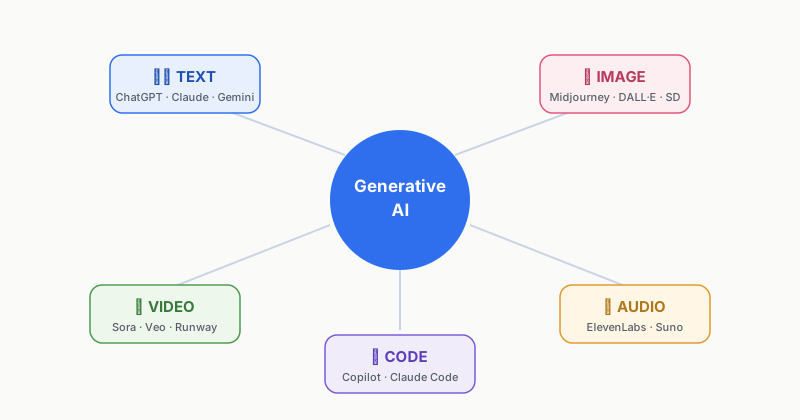
"I hear AI can draw pictures and make videos now — but what do I actually use, and where?" It's the question I get asked most often. In this post, I'll draw a full map of generative AI, organized by the kind of content it creates, along with the leading services in each field.
① Text Generation — The Most Widely Used Field
This is the field that writes, summarizes, translates, and even codes. The tools people casually call "AI chatbots" all live here.
| Service | Made by | What stands out |
|---|---|---|
| ChatGPT | OpenAI | The most famous, with the broadest user base and a wide range of features |
| Claude | Anthropic | Strong at handling long documents and writing naturally |
| Gemini | Strong integration with Google Search, Gmail, and Docs |
Use cases: drafting emails, summarizing reports, translating, outlining blog posts, writing code. If you work an office job, this is where you'll feel the impact most.
② Image Generation — Painting with Sentences
Type a sentence (a prompt) like "a cat walking along a beach at sunset, watercolor style," and it produces the picture for you.
- Midjourney — Beloved by designers for its high artistic polish
- DALL·E — Available right inside ChatGPT, so the barrier to entry is low
- Stable Diffusion — Open source; install it on your own machine and use it for free
Use cases: blog illustrations, presentation visuals, concept sketches, logo ideas. For commercial use, always check each service's licensing policy first.
③ Video Generation — The Fastest-Moving Field
Feed it a sentence or an image and it produces a short video. This field has advanced faster than any other over the past year or two, led by OpenAI's Sora, Google's Veo, and Runway. For now it's better suited to clips of a few seconds to a few dozen seconds than to long-form video, but real-world use has already begun in ads, music videos, and product prototypes.
④ Voice and Music Generation
- Text-to-speech (TTS) — Reads text aloud in a natural voice. Training it on your own voice to clone it is now possible too. (ElevenLabs and others)
- Music generation — Write "mellow lo-fi hip hop, good for studying" and it composes the track. (Suno, Udio, and others)
Use cases: YouTube narration, podcasts, background music. That said, voice cloning raises real abuse concerns (voice-phishing scams and the like), and regulators around the world are actively debating how to handle it.
⑤ Code Generation — The Developer's New Colleague
This field writes, fixes, and explains programming code. GitHub Copilot, Claude Code, and Cursor are the flagship tools, and things have progressed to the point where "describe what you want in plain words and it builds the app, no coding knowledge required." These days that approach even has a name: vibe coding.
Today's Takeaways
- Generative AI splits into text, image, video, audio, and code, based on what it creates.
- Text (ChatGPT, Claude, Gemini) is the most mature field with the widest range of uses.
- Video and audio are advancing fastest — and the ethical and copyright issues are growing just as fast.
- Before any commercial use, always check each service's license.
In the next post, we'll cover the skill that determines output quality no matter which generative AI you use: writing prompts.